+ × ÷ = %
Matematt — Maths for Primary School Children
Launch in preparation
No ads · No tracking · Privacy by Design · 7-day free trial at launch

MateMatt teaches maths
step by step

For primary school children. Long division, multiplication, addition and subtraction guided in columns, with reports for parents, personalised homework and zero ads.

See how it works
7-day free trial at launch
No ads
Privacy by Design
0+ structured lessons

Discover Matematt

Real screenshots from the app. No mockups — this is what you'll actually see.

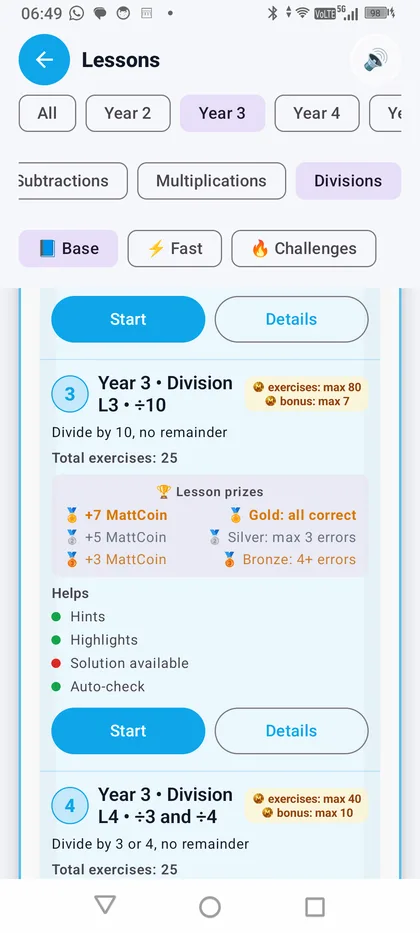
Guided Path with 62+ progressive lessons
📚

Guided Path

62+ progressive lessons from Year 2 to Year 5, aligned to the UK National Curriculum (Department for Education). Each lesson has 3 categories — Core, Special and Challenge — and 3 star levels to earn. Includes MTC preparation for Year 4. Progress unlocks step by step: no shortcuts, just solid learning.

Year 2–5 3 levels per lesson Rewards and stars
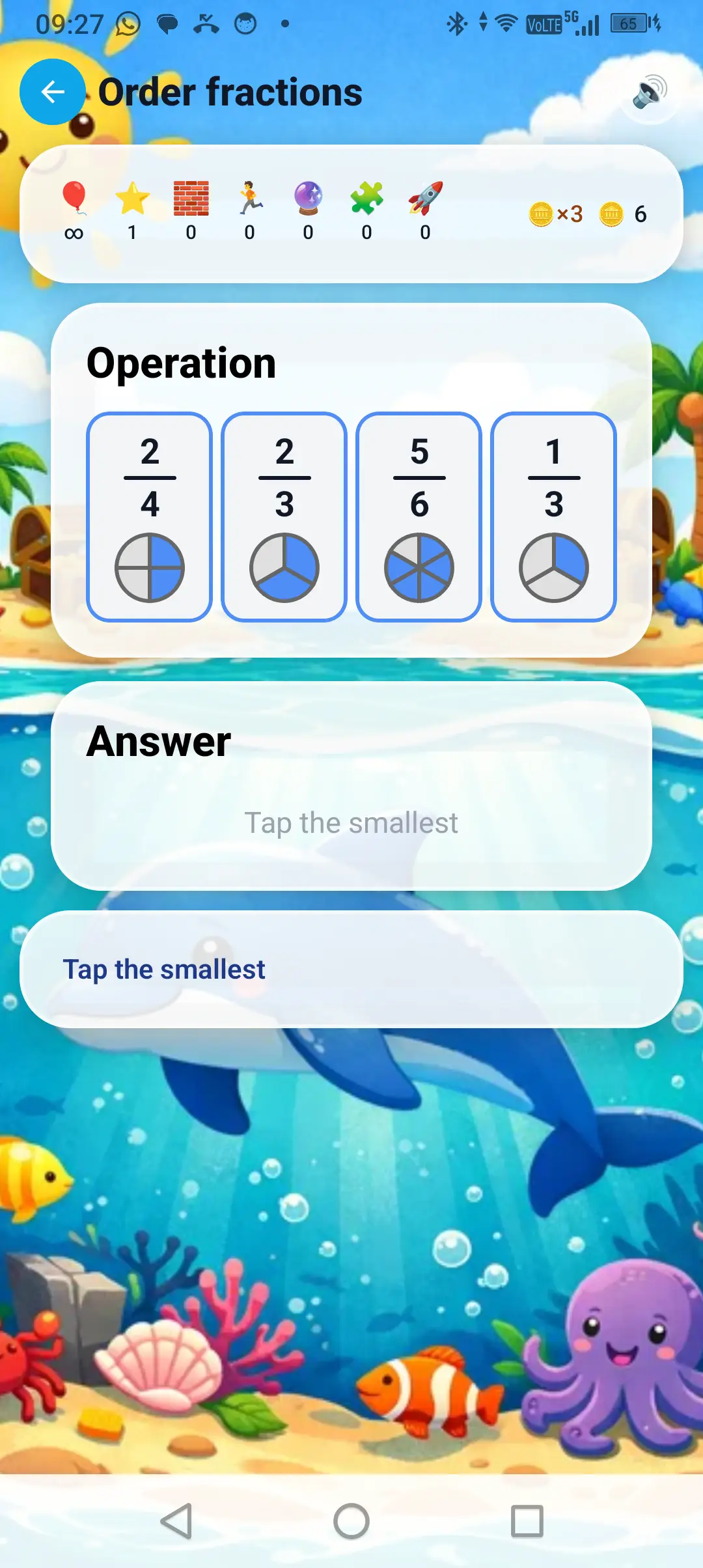
Free Play with all operations
🎮

Free Play

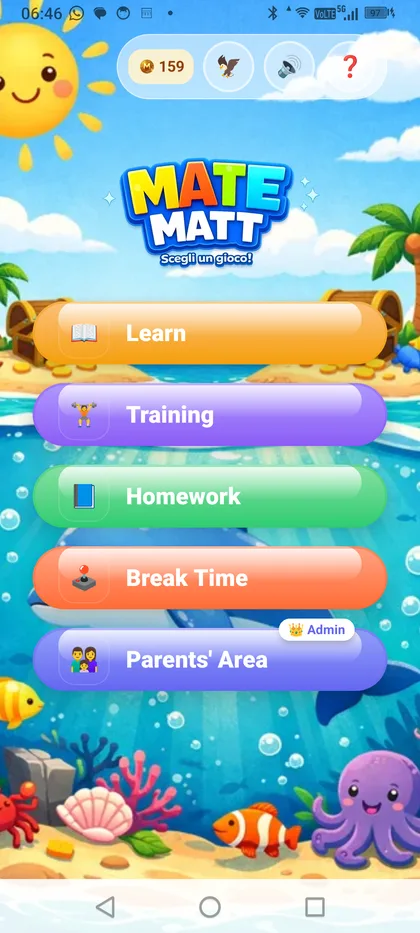
Choose the operation you want — Addition, Subtraction, Multiplication, Division or Times Tables — and practise freely. Complete exercises to earn MatCoin and unlock bonus mini-games.

5 operations Bonus mini-games MatCoin
Column addition with visual carrying

Column Addition

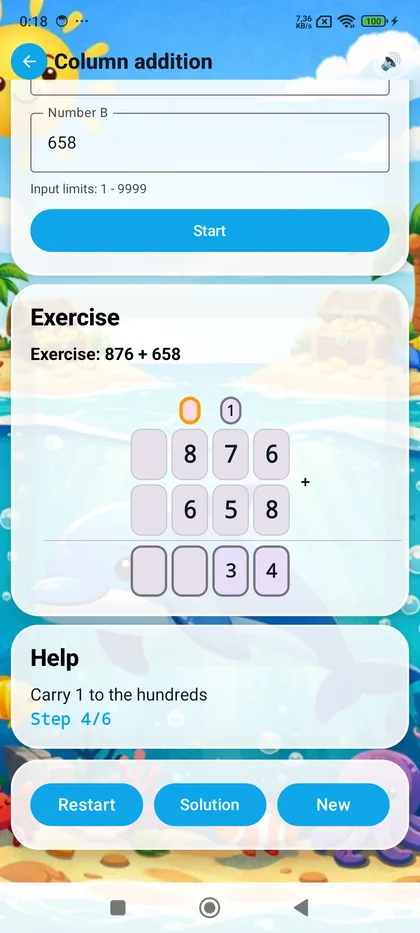
The app guides the child digit by digit, starting from the ones. When the sum exceeds 9, the carry appears visually above the next column. Text hints explain each step: "7 + 8 = 15, write 5 and carry 1". Numbers from 1 to 4 digits, with and without decimals.

Step-by-step Visual carrying 1–4 digits
Subtraction with highlighted borrowing

Subtraction with Borrowing

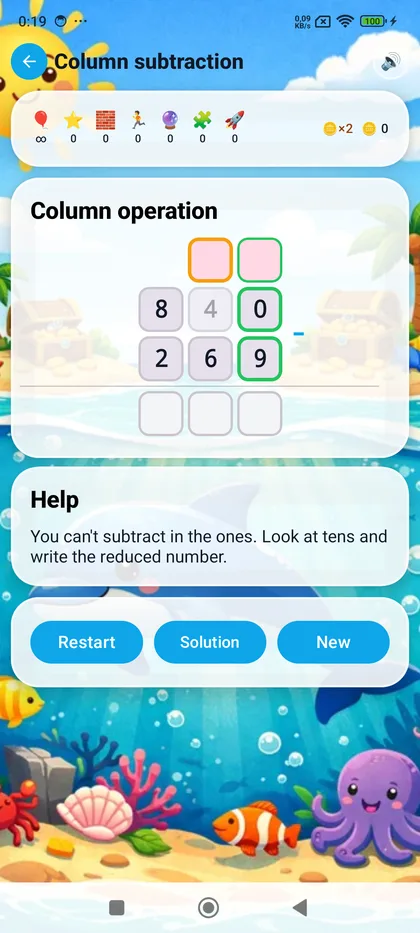
When the top digit is smaller, the app explains how to borrow from the next column. Colour highlighting for the digits involved, with clear messages: "You can't subtract 8 from 4 — borrow from the tens". The column method, made understandable.

Guided borrowing Colour-coded columns
Multi-digit column multiplication
✖️

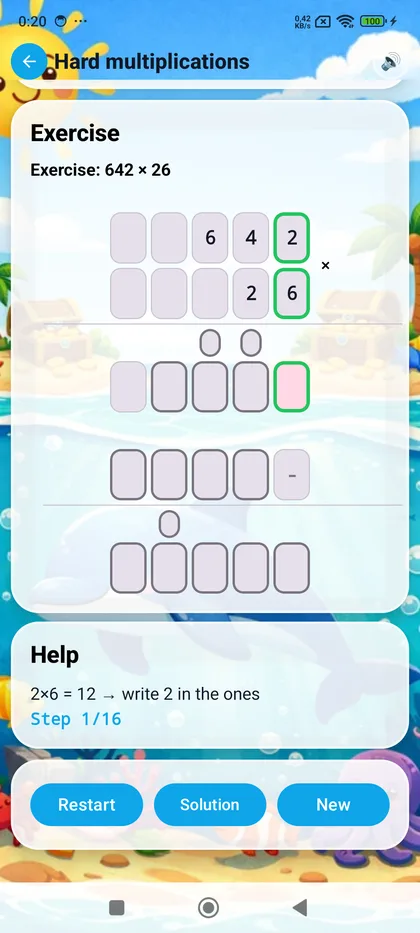
Column Multiplication

From times tables to 3-digit by 2-digit multiplication. The app breaks down the calculation: first multiply by the ones, then by the tens, then add the partial products. Every step is guided with hints like "8 x 5 = 40, write 0 in the ones and carry 4". Visual carries are built in.

Partial products Up to 3x2 digits
Step-by-step long division with guided algorithm

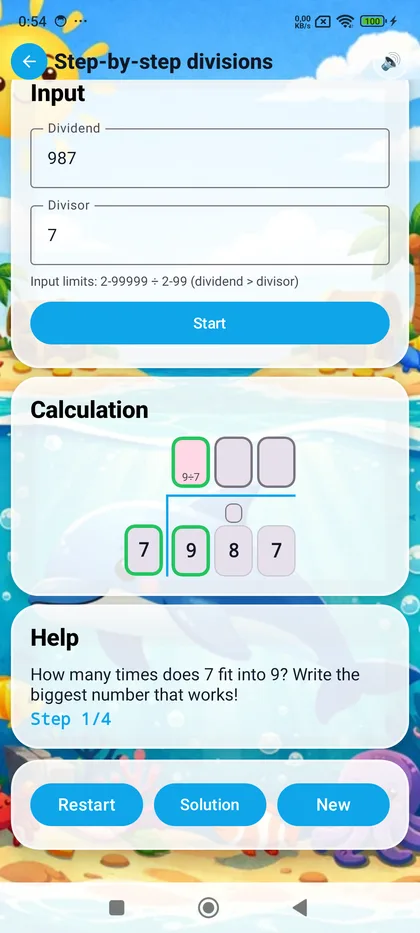
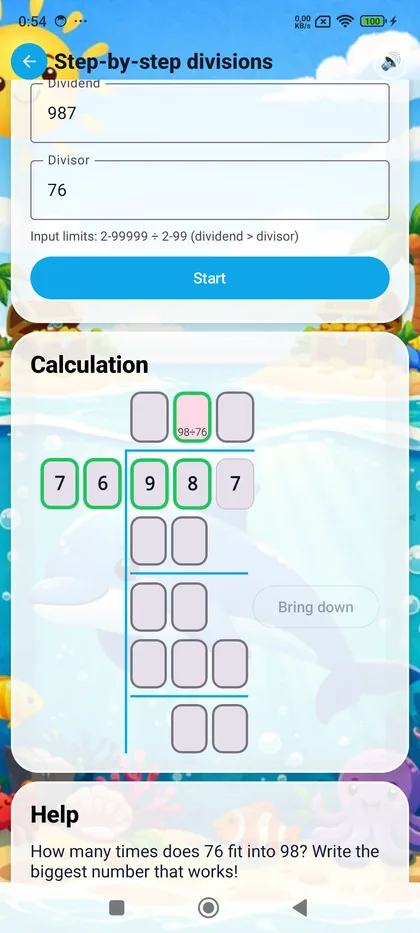
Long Division Step by Step

The most complex operation, made accessible. The app teaches the algorithm: divide, multiply, subtract, bring down the next digit. With 1 or 2-digit divisors and dividends up to 5 digits. The child chooses the difficulty before starting, with a dedicated selector.

Divide-Multiply-Subtract-Bring down Up to 5 digits
Custom homework system
📝

Custom Homework

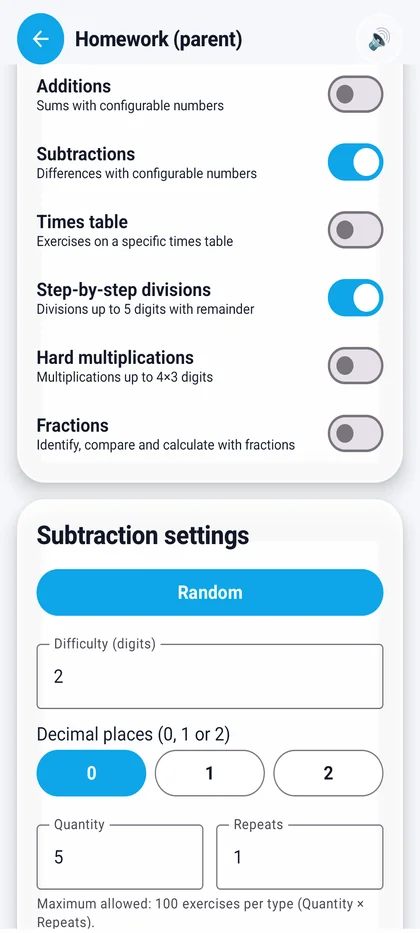
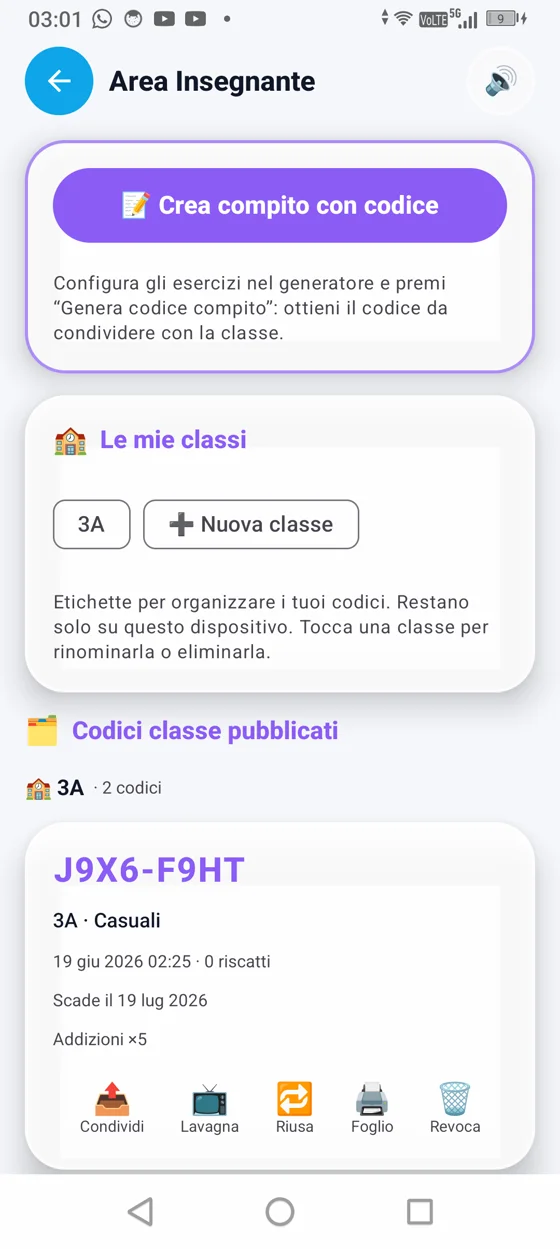
Parents or teachers create homework by choosing the operation, difficulty and number of exercises. A unique code is generated automatically: just share it and the student enters it to start. Every homework is archived with detailed results.

Create and share Homework archive
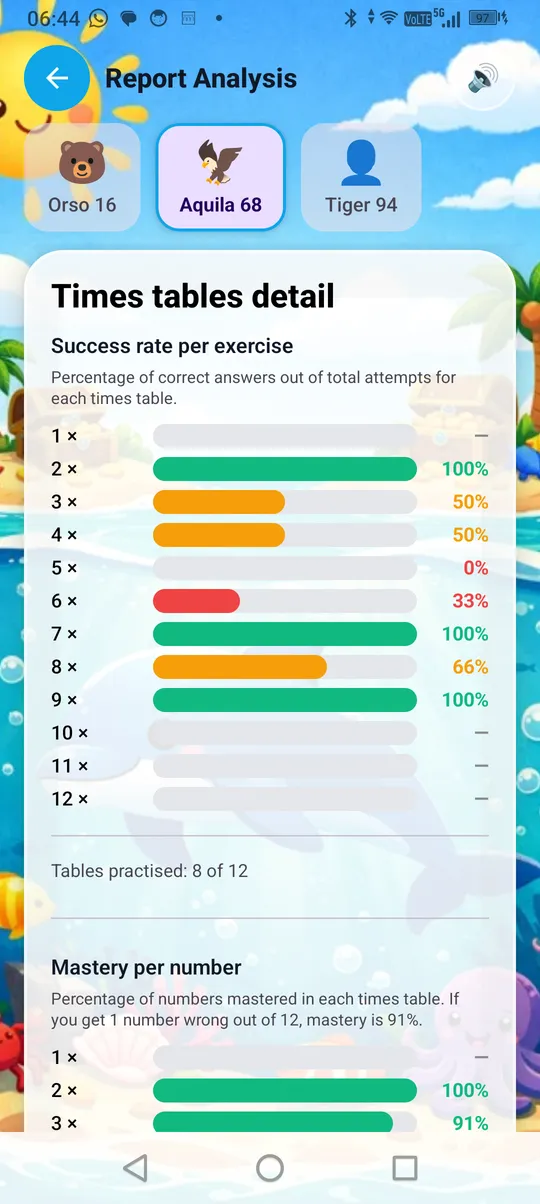
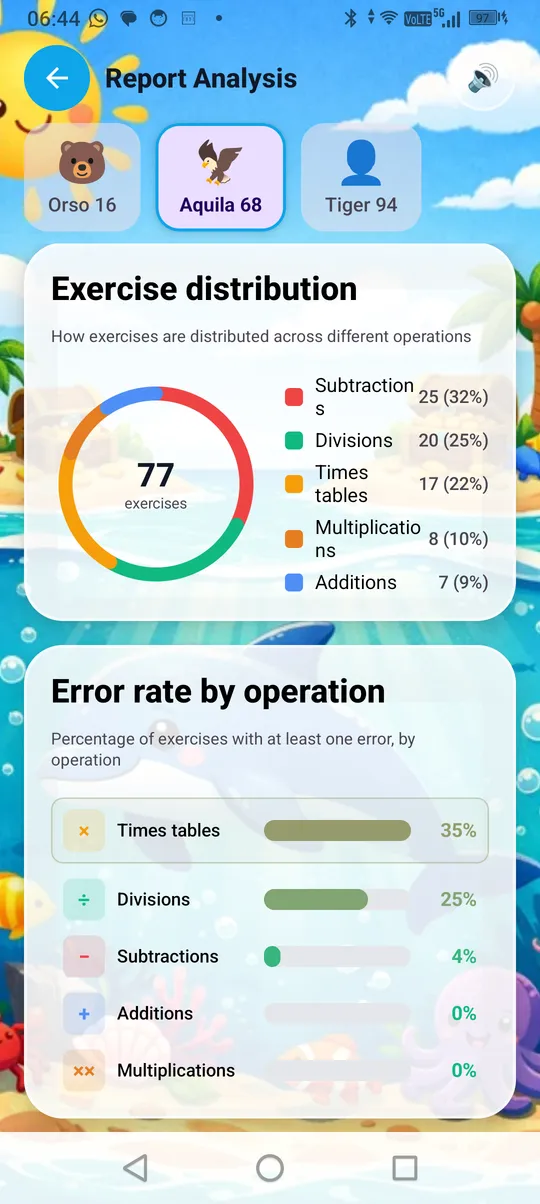
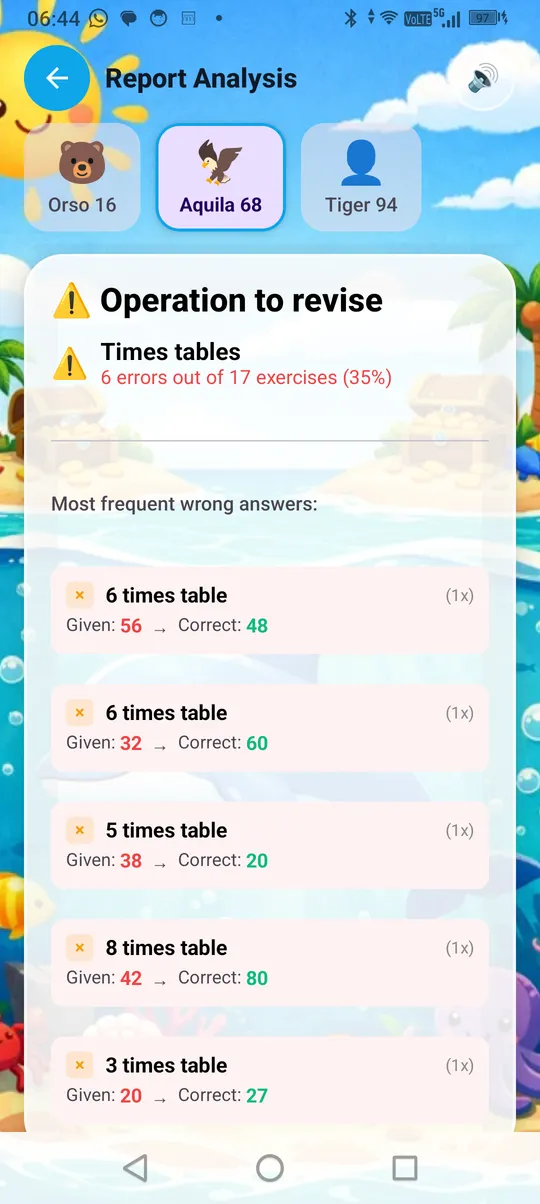
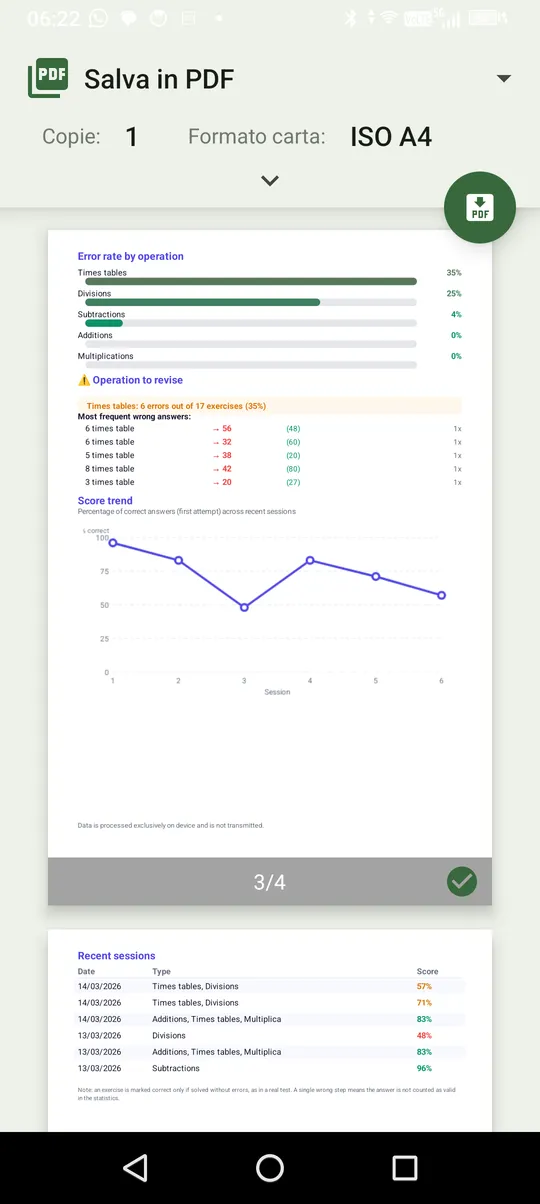
Detailed reports with per-exercise results
📊

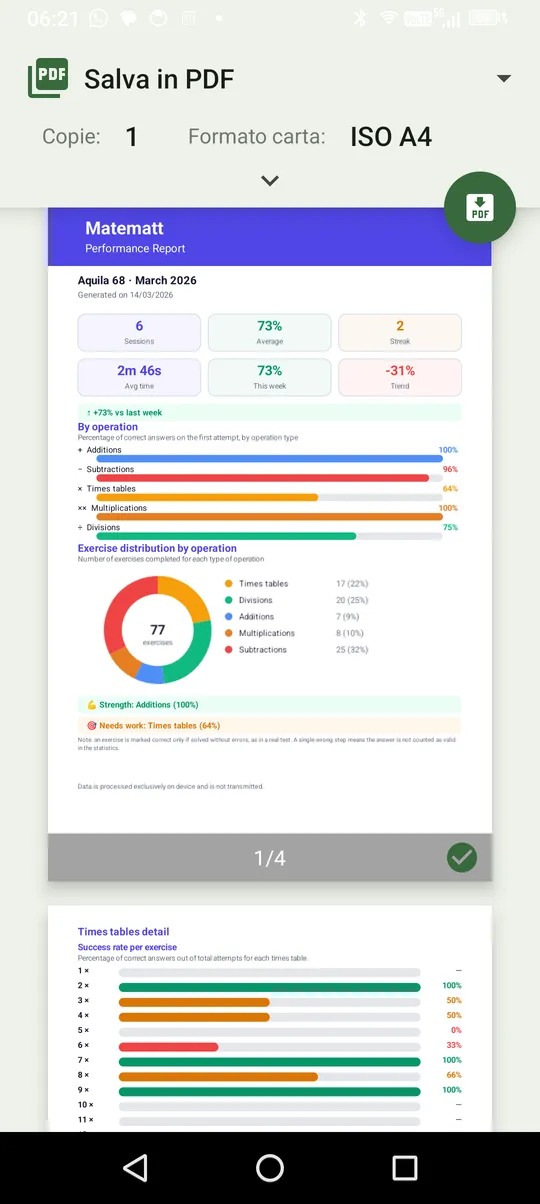
Detailed Reports

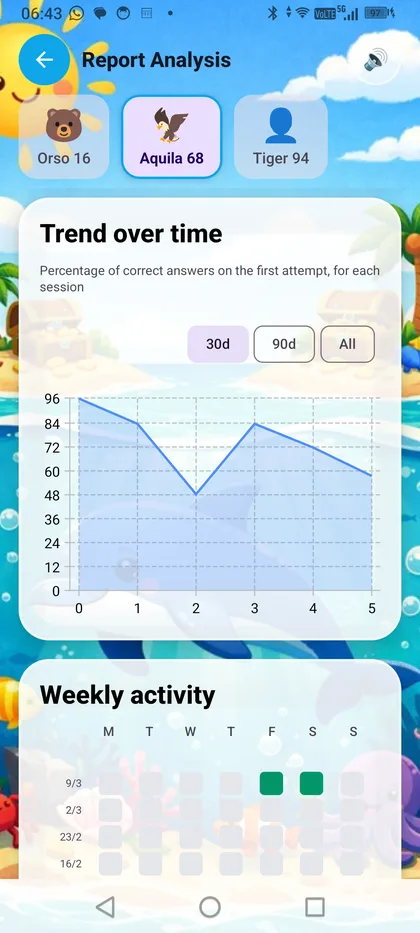
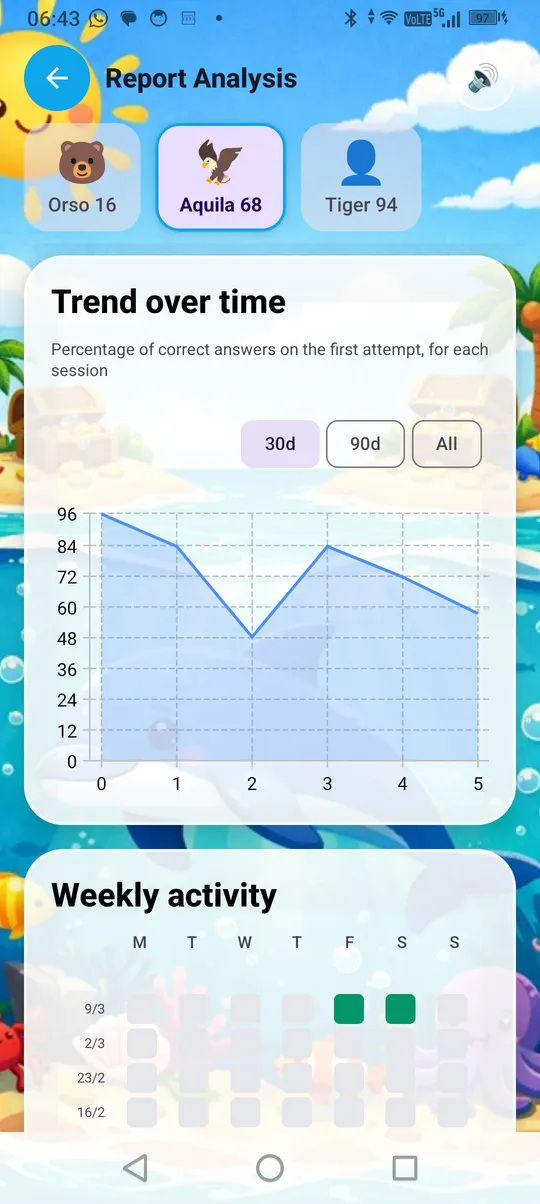
Every exercise is tracked: the operation performed, the answer given, the number of attempts, the result. Parents can print or share the report. In the Family section, reports from the group are visible in real time with end-to-end encryption.

Print and share E2E encryption

Everything you need to learn

It's not just a quiz. It's a complete learning path with guided instruction, independent practice, a homework system and a reward system that teaches the value of effort.

📚

Guided Path

62+ progressive lessons from Year 2 to Year 5, aligned to the UK National Curriculum. Each lesson unlocks when the previous one is completed, with 3 levels of support: Guided, Practice and Challenge. Core, Special and Challenge lessons for each operation.

📝

Homework System

Parents or teachers create custom homework and share it with a code. The student completes it and the parent receives a detailed report with every answer given.

👨‍👩‍👧‍👦

Family Groups

Create a family group with parent and child roles. Up to 5 profiles per device. Data protected with AES-256-GCM end-to-end encryption. Parental PIN to protect parent sections. Monitor progress and assign homework.

🪙

MatCoin System

Every correct answer earns MatCoin. Children accumulate them at their own pace — no pressure, no timers — and use them to access bonus mini-games. It teaches planning and the value of effort.

🎈

Bonus Games

Balloons to pop and Shooting Stars to catch. Accessible with a few MatCoin after a series of exercises, or with a bigger effort for the special challenges.

🔢

Step-by-Step

Column operations don't just show the result — they teach the method, step by step. With visual carrying, guided borrowing and Check of Nines built into division (Italian curriculum).

📊

Reports and Tracking

Every exercise tracked: operation, answer, attempts and outcome. JSON export available (GDPR Art. 20). Your data stays yours, protected and never shared.

🌍

Multi-Curriculum

Three curricula aligned to official guidelines: National Curriculum (United Kingdom), Common Core (United States) and MIUR (Italy). The app automatically adapts to the device language.

MatCoin: the value of effort

Not just calculations. Matematt teaches children essential life skills: planning, saving, and making mindful choices.

🪙 How the MatCoin system works

Every correct answer earns MatCoin. There is no way to buy them with real money — they can only be earned through effort. The child decides how to spend them: a mini-game right away with a few coins, or save up for something bigger. No pressure, no timers, no stress. Just the satisfaction of building something through their own work.

🎯

Earn through effort

1 MatCoin for every correct answer. Bonus for stars earned in lessons (10, 5 or 2 coins). Everything is earned through exercises — nothing is bought.

🎮

Spend wisely

Some games cost just a few coins — just solve a handful of exercises. Others require a bigger effort: the child learns to decide whether to spend now or save for a bigger goal.

🧘

Zero stress, zero pressure

No countdown to spend. No penalties. MatCoin stay there until the child decides what to do with them. The system rewards consistency, not rushing.

🌱 Real life skills

The MatCoin system is not just a game mechanic. It's an educational tool designed to teach children skills they will use for the rest of their lives — well beyond maths. These are real life skills that begin with simple choices in a safe environment and grow into habits that shape how children approach the world.

📋
Planning and resource management Children learn to think ahead: "If I save today, tomorrow I can play the game I really want." They begin to understand that resources are finite and that managing them well leads to better outcomes.
Delayed gratification Choosing not to spend right away in order to get something better later. Research consistently links this skill to greater success in adult life — and it starts with small, everyday decisions like these.
💪
Understanding the value of effort Every MatCoin is the result of an exercise done well. Children see in concrete terms that their own effort has real value — a lesson that no amount of lecturing can replace.
🧠
Mindful decision-making Spend now or wait? Children practise weighing alternatives and making decisions — a fundamental skill for real life that extends far beyond any app or classroom.
🏦
Financial literacy basics Earning, saving, spending wisely. On a small scale, children learn the foundational principles of resource management — the building blocks of financial literacy that will serve them throughout life.
🎯
Perseverance Reaching a goal takes consistent effort. Children learn that persistence pays off — in maths and in life. The reward isn't given; it's built, one exercise at a time.

Aligned to official guidelines

Three curricula, each aligned to the official guidelines of its country's education authority. The app automatically adapts to the device language.

🇮🇹

Italian Curriculum

Indicazioni Nazionali — MIUR (Italy's Ministry of Education and Merit)

155+ lessons from Classe I to Classe IV, organised by progressive skills as set out by the Indicazioni Nazionali for primary school education.

  • Column addition, subtraction, multiplication and division
  • Times tables up to 10, with 5 practice modes
  • Check of Nines (Prova del Nove) built into division
  • Decimal operations (Classe IV)
  • Invariant property, complements, missing numbers
🇬🇧

UK Programme

National Curriculum — Department for Education (DfE)

62+ lessons from Year 2 to Year 5, aligned with the National Curriculum for Mathematics in England. Includes preparation for the Multiplication Tables Check (MTC) in Year 4.

  • Column addition, subtraction, multiplication, division
  • Times tables up to 12, with MTC preparation
  • Long division with 1-2 digit divisors
  • Decimal operations (Year 5)
  • Missing numbers, inverse operations
🇺🇸

US Program

Common Core State Standards (CCSS) — National Governors Association

50+ lessons from Grade 1 to Grade 4, inspired by the Common Core State Standards for Mathematics (CCSS-M), adopted by the majority of US states.

  • Column addition, subtraction, multiplication, division
  • Times tables up to 9 (fluency by Grade 3)
  • Multi-digit division step-by-step
  • Place value and decimal concepts
  • Word problems and number sense

6 areas, 0+ game modes

From the first addition to column decimals. Every operation with the teaching depth that truly matters.

Addition
Column, 1–4 digits, decimals
Subtraction
Column, with borrowing
✖️
Times Tables
Classic, Mixed, Gaps, Inverse, Quiz
🔢
Multiplication
Column, 2x2 and 3x2 digits
Long Division
Step-by-step, up to 5 digits
🔣
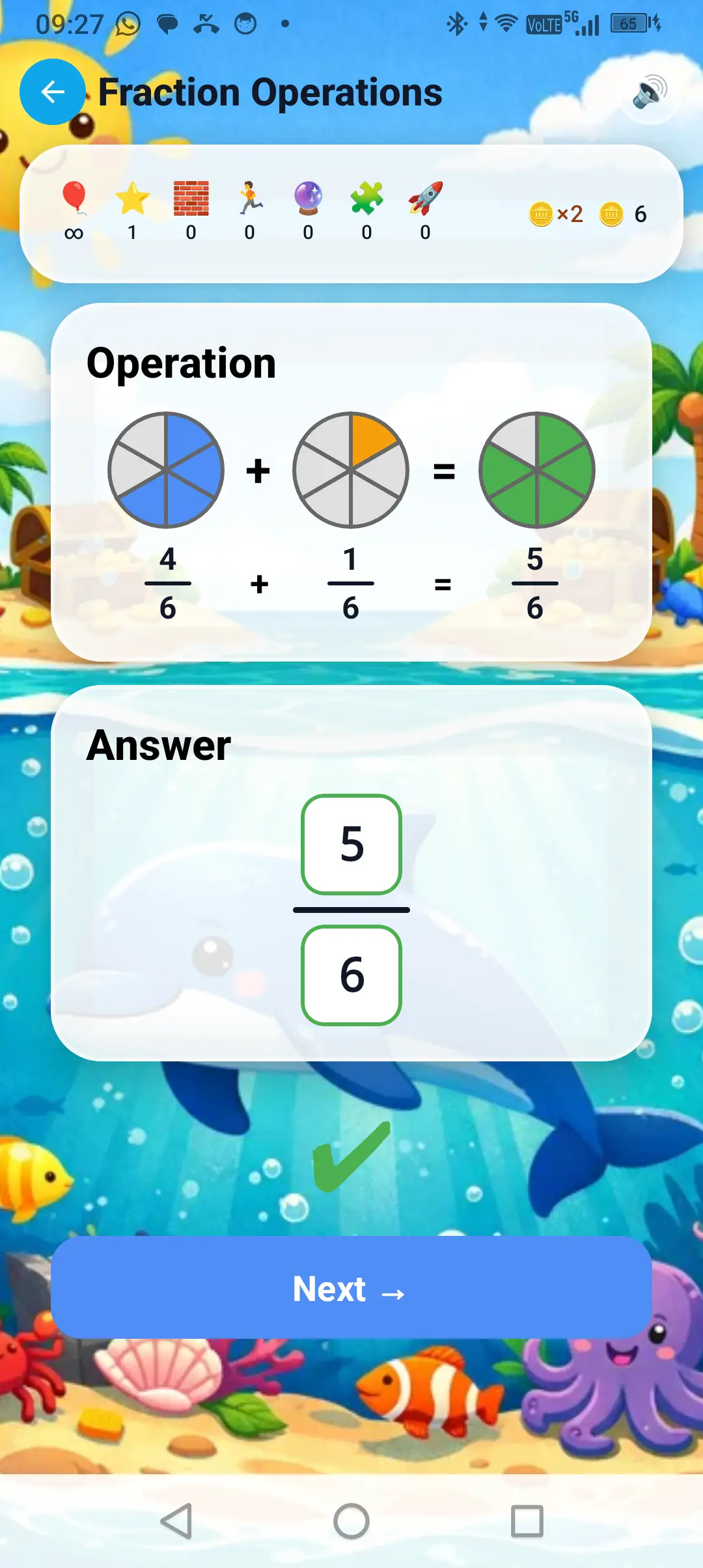
Decimals
Addition and subtraction, Year 4

Learn operations step by step

Teaching guides with real screenshots from the app. Discover how Matematt teaches each operation, one step at a time.

Designed to protect your child

Children's privacy is not an afterthought. It is the principle on which the app was built, from the very first line of code.

🛡️ Privacy by Design

No advertisingNever, in any section of the app
No personal dataWe don't ask for email, real name, or age
One of the few apps with zero trackingWe don't monitor user behaviour
No profilingWe don't sell or share data
End-to-end encryptionAES-256-GCM for Family data
Parental PINProtect parent sections with a 4-digit PIN
Complete deletionOne tap to delete everything, local and cloud
Revocable consentEach consent can be toggled individually from Settings
Data exportDownload all your data in JSON format (Art. 15/20 GDPR)
GDPR, COPPA & UK Children’s Code compliantVerified for EU, UK and US markets

Last updated: March 2026 · Read the full version →

Design Principle

Matematt is designed from the ground up for Data Protection by Default (Privacy by Design, Art. 25 GDPR). The protection of children's privacy is not an added compliance measure, but the architectural foundation of the app. Every feature is designed by asking first: "What data can we NOT collect?".

  • Matematt does not require email, phone number, or contact details.
  • Matematt does not collect real names, surnames, dates of birth, or location.
  • Matematt does not contain any form of advertising.
  • Matematt does not profile users for commercial purposes.
  • Matematt does not sell or share data with third parties for marketing.
  • Matematt does not use analytical tracking tools.

Encryption of Family data

When the Family feature is active, sensitive data (profile names, exercise results, assigned homework) is encrypted with AES-256-GCM end-to-end encryption before being sent to the cloud. The group key is exchanged between family devices via RSA-2048. Not even the server can read the contents.

Intended audience

The app is intended for children aged 6–11, used under the supervision of a parent or legal guardian.

Data stored on device

The app saves locally: a random avatar (e.g. "Lion 42"), a game nickname (if changed by the user), exercise results, guided path progress, MatCoin balance, and homework codes. This data stays on the device and is deleted when the app is uninstalled.

Family feature (optional)

If activated by a parent, it allows assigning homework and viewing results via the Firebase cloud service (Google LLC). Data is associated exclusively with an anonymous technical identifier randomly generated by the app (UUID) — not linked to email, name, or device. Contents are protected with end-to-end encryption. Parent sections can be protected with a 4-digit parental PIN (local SHA-256 hash), synchronised across the group with AES-256-GCM encryption.

Technical error reporting

The app uses Firebase Crashlytics, activated exclusively after explicit parental consent. It collects only technical information about errors. No personal data or exercise results are sent.

Data retention

On-device data is deleted when the app is uninstalled. Firebase data is retained until the user requests deletion or is automatically deleted after 180 days of inactivity.

Parental rights (Art. 15–22 GDPR)

Parents can at any time:

  • Access (Art. 15): view results in the Report section and group data in the Family section
  • Rectification (Art. 16): edit profile and avatar within the app
  • Erasure (Art. 17): delete all data (local and cloud) from Family → “Delete all data”
  • Restriction (Art. 18): request restriction of processing by writing to privacy@matematt.app
  • Portability (Art. 20): export your data in JSON format from the Settings section
  • Objection (Art. 21): object to processing by writing to privacy@matematt.app
  • Withdraw consent (Art. 7.3): disable Crashlytics or the Family feature individually from Settings. Withdrawal does not affect the lawfulness of prior processing

Contact: privacy@matematt.app — we respond within 30 days. EU residents: Garante per la Protezione dei Dati Personali; UK residents: Information Commissioner’s Office.

Technical services and data transfers

Firebase Authentication, Cloud Firestore and Firebase Crashlytics, provided by Google LLC (data processor, Art. 28 GDPR). Data transfers to the United States are covered by the EU–US Data Privacy Framework (DPF). Sensitive data is end-to-end encrypted and unreadable by the processor.

Data Controller

Davide Sironi
Privacy contact: privacy@matematt.app

Regulatory compliance

Privacy policy drafted in compliance with EU Regulation 2016/679 (GDPR) — Art. 5, 6, 8, 13, 17, 25, 28; Italian Privacy Code (D.Lgs. 196/2003); COPPA (15 U.S.C. §§ 6501–6506); UK Age Appropriate Design Code (Children’s Code); UK Data Protection Act 2018.

Where we are now

MateMatt is currently undergoing bug testing and final refinement. This website showcases the product, the features planned for launch, and the expected usage model. Publication on Google Play will follow after the testing phase.

Coming soon to Google Play.

FAQ

Is MateMatt already available?
Not yet. The app is in the bug testing and final refinement phase. Publication on Google Play is planned once testing is complete.
When will it be published?
We don't have a precise date yet. Launch will happen when the testing phase is complete and the app is 100% stable.
Is MateMatt really ad-free?
Yes. MateMatt contains no advertising of any kind, in any section. No banners, no promotional videos, no sponsored content.
What's the difference between the basic and Premium version?
The basic version lets you get started with one profile and some lessons. Premium unlocks all lessons, parent reports, personalised homework, the family feature and all future updates.
Can I try the app for free?
Yes. At launch there will be a 7-day free trial with access to all Premium features. The basic version will always remain free.
Can I use the app for more than one child?
Yes. With Premium you can create multiple child profiles on the same device (up to 5). Each profile has its own progress, MatCoins and separate reports.
Does the app collect children's personal data?
No. MateMatt doesn't ask for email, real name, date of birth or any other personal data. The child's identity is a random avatar and a game nickname.
Does it work for homework and revision?
Yes. Parents or teachers can create personalised homework by choosing the operation, difficulty and number of exercises, then share it with a code. Results are archived with detailed reports.
Which languages are available?
MateMatt is available in Italian, English (UK and US) and Spanish. The app automatically adapts to the device language and offers curricula aligned to each country's standards.